Edge Delta IBM Object Storage Destination
19 minute read
Overview
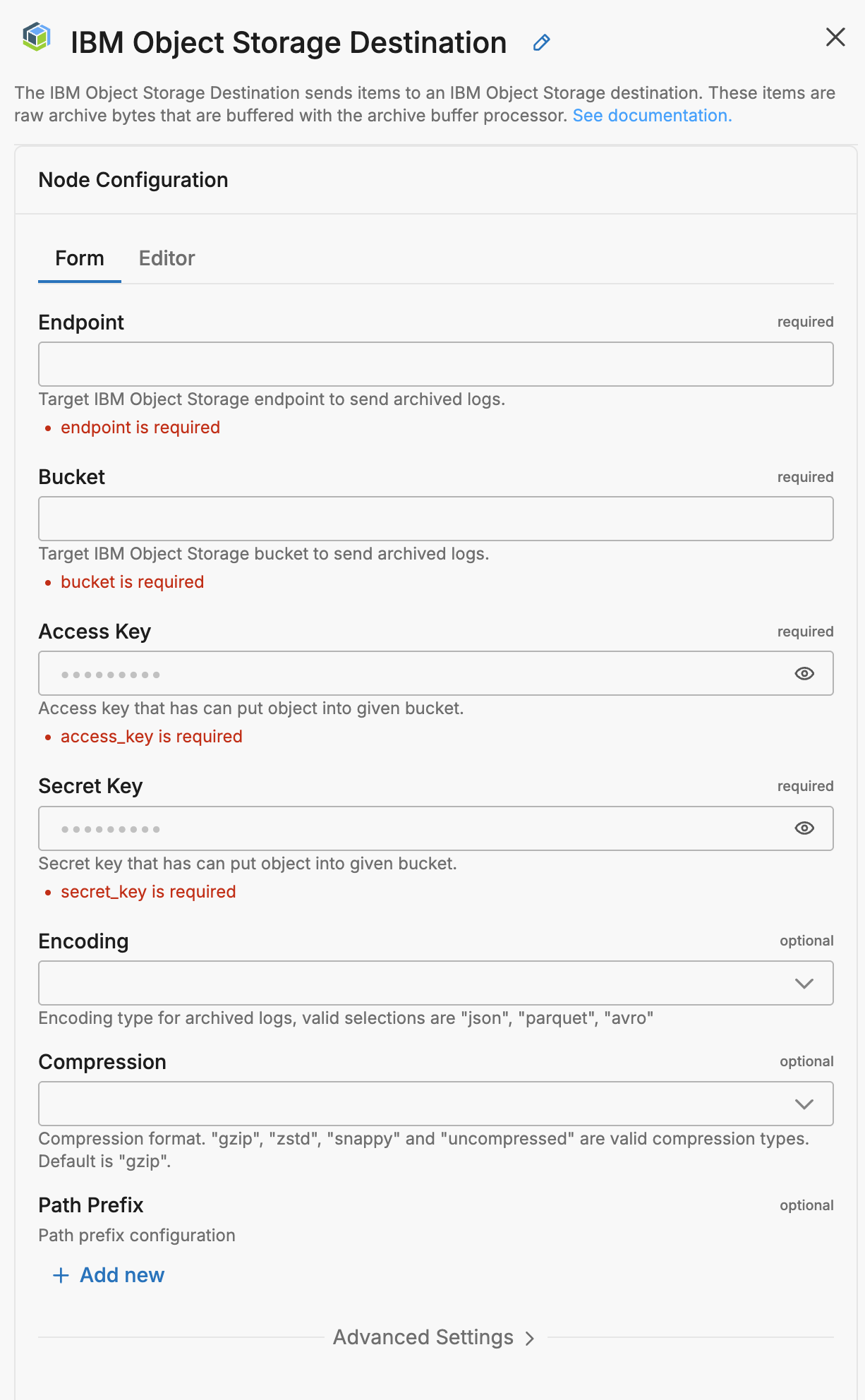
The IBM Object Storage destination node sends items to an IBM Object Storage destination. These items are raw archive bytes that are buffered with the archive buffer processor.
- incoming_data_types: log
This node requires Edge Delta agent version v0.1.59 or higher.
Example Configuration
nodes:
  - name: my_ibm_os
    type: ibm_object_storage_output
    endpoint: <REDACTED>
    bucket: <REDACTED>
    access_key: <REDACTED>
    secret_key: <REDACTED>
    compression: zstd
    encoding: parquet
    use_native_compression: true
    path_prefix:
      order:
      - Year
      - Month
      - Day
      - Hour
      - 2 Minute
      - tag
      - host
      format: ver=parquet/year=%s/month=%s/day=%s/hour=%s/min=%s/tag=%s/host=%s/
Required Parameters
name
A descriptive name for the node. This is the name that will appear in pipeline builder and you can reference this node in the YAML using the name. It must be unique across all nodes. It is a YAML list element so it begins with a - and a space followed by the string. It is a required parameter for all nodes.
nodes:
  - name: <node name>
    type: <node type>
type: ibm_object_storage_output
The type parameter specifies the type of node being configured. It is specified as a string from a closed list of node types. It is a required parameter.
nodes:
  - name: <node name>
    type: <node type>
endpoint
The endpoint parameter specifies the IBM Object Storage endpoint. It is specified as a string and is required.
nodes:
- name: <node name>
  type: ibm_object_storage_output
  endpoint: <IBM Object Storage endpoint>
  bucket: <target bucket>
  access_key: <access key>
  secret_key: <key secret>
bucket
The bucket parameter defines the target bucket to use. It is specified as a string and is required.
nodes:
- name: <node name>
  type: ibm_object_storage_output
  endpoint: <IBM Object Storage endpoint>
  bucket: <target bucket>
  access_key: <access key>
  secret_key: <key secret>
access_key
The access_key parameter defines the access key to authorize access to the bucket. It is specified as a string and is a required parameter.
This field supports secret references for secure credential management. Instead of hardcoding sensitive values, you can reference a secret configured in your pipeline.
To use a secret in the GUI:
- Create a secret in your pipeline’s Settings > Secrets section (see Secrets)
- In this field, select the secret name from the dropdown list that appears
To use a secret in YAML:
Reference it using the syntax: '{{ SECRET secret-name }}'
Example:
field_name: '{{ SECRET my-credential }}'
Note: The secret reference must be enclosed in single quotes when using YAML. Secret values are encrypted at rest and resolved at runtime, ensuring no plaintext credentials appear in logs or API responses.
nodes:
- name: <node name>
  type: ibm_object_storage_output
  endpoint: <IBM Object Storage endpoint>
  bucket: <target bucket>
  access_key: <access key>
  secret_key: <key secret>
secret_key
The secret_key parameter defines the secret key to authorize access to the bucket. It is specified as a string and is a required parameter.
This field supports secret references for secure credential management. Instead of hardcoding sensitive values, you can reference a secret configured in your pipeline.
To use a secret in the GUI:
- Create a secret in your pipeline’s Settings > Secrets section (see Secrets)
- In this field, select the secret name from the dropdown list that appears
To use a secret in YAML:
Reference it using the syntax: '{{ SECRET secret-name }}'
Example:
field_name: '{{ SECRET my-credential }}'
Note: The secret reference must be enclosed in single quotes when using YAML. Secret values are encrypted at rest and resolved at runtime, ensuring no plaintext credentials appear in logs or API responses.
nodes:
- name: <node name>
  type: ibm_object_storage_output
  endpoint: <IBM Object Storage endpoint>
  bucket: <target bucket>
  access_key: <access key>
  secret_key: <key secret>
Optional Parameters
disabled
The disabled parameter disables the node in the pipeline. When set to true, the agent ignores the node at startup. You can toggle nodes on or off in the pipeline builder. It is specified as a boolean, defaults to false, and is optional.
nodes:
  - name: <node name>
    type: <node type>
    disabled: true
compression
The compression parameter specifies the compression format. It can be gzip, zstd, snappy or uncompressed. It is specified as a string, has a default of gzip, and it is optional.
nodes:
- name: <node name>
  type: ibm_object_storage_output
  endpoint: <IBM Object Storage endpoint>
  bucket: <target bucket>
  access_key: <access key>
  secret_key: <key secret>
  compression: gzip | zstd | snappy | uncompressed
schema
The schema parameter specifies the schema format for archived data. It can be Archive or Raw. It is specified as a string, has a default of Archive, and is optional.
Archive- Uses the structured Edge Delta archive format (ArchiveLogPayload) for the archived data. This is the standard format for OTel-structured data, preserving fields such asbody,attributes,resource, andtimestampin their original nested structure.Raw- Uploads incoming items directly as a flatmap[string]anyto the archive destination. Use this only with deotelized data. When data has been processed by the Deotel processor, the OTel envelope is removed and fields are promoted to the top level —Rawpreserves that flattened structure as-is. Raw does not extract or restructure fields; if the data still has OTel structure (with nestedattributes,resource, orbody), those fields will remain nested in the output.
nodes:
  - name: <node name>
    type: <output type>
    schema: Archive | Raw
user_schema (Schema Spec)
Minimum Agent Version: v2.8.0
The user_schema parameter (displayed as Schema Spec in the UI) provides an optional schema definition that tells the serializer what column names and types to expect in the output. You can specify your schema in two ways:
- Inline JSON - Define the schema directly in YAML format
- File path - Reference an external JSON schema file using
file://<path>format (requires agent v2.10.0+)
Important: user_schema applies only when encoding is set to parquet. It is not used for JSON encoding. It is also not a field extraction or restructuring tool — it does not select, rename, or promote fields from the incoming data. It tells the Parquet serializer what column names and types to expect for data that has already been flattened. For this reason, user_schema is intended for use with schema: Raw and deotelized data — the Deotel processor removes the OTel envelope and promotes fields to the top level, and user_schema then describes those top-level fields to the serializer.
If your data is still OTel-structured (fields nested under attributes, resource, or body), user_schema will not flatten those fields into columns. You need to deotelized the data first.
Inline schema example (with deotelized data):
nodes:
  - name: <node name>
    type: <archive_output_type>
    schema: Raw
    encoding: parquet
    user_schema: |
      {
        "fields": [
          {"name": "timestamp", "type": "timestamp"},
          {"name": "message", "type": "string"},
          {"name": "level", "type": "string"},
          {"name": "service", "type": "string"}
        ]
      }
File path example (v2.10.0+):
nodes:
  - name: <node name>
    type: <archive_output_type>
    schema: Raw
    encoding: parquet
    user_schema: file:///etc/edgedelta/schemas/custom-schema.json
Use Cases:
- Define specific column types for Parquet files to ensure compatibility with query engines like Athena or BigQuery
- Ensure type consistency across pipelines when working with deotelized data
- Share schema definitions across multiple pipelines using external schema files
disable_compaction
This parameter configures whether to disable compaction by the Compactor Agent for data from this node before it is sent to the data destination. It is specified as a boolean, the default is false and it is optional.
nodes:
- name: <node name>
  type: ibm_object_storage_output
  endpoint: <IBM Object Storage endpoint>
  bucket: <target bucket>
  access_key: <access key>
  secret_key: <key secret>
  disable_compaction: true
disable_ssl
The disable_ssl parameter defines whether to use HTTP instead of HTTPS for accessing the bucket. It is specified as a Boolean and the default is false indicating that SSL is required. It is optional.
nodes:
- name: <node name>
  type: ibm_object_storage_output
  endpoint: <IBM Object Storage endpoint>
  bucket: <target bucket>
  access_key: <access key>
  secret_key: <key secret>
  disable_ssl: true
encoding
The encoding parameter specifies the encoding format. It can be json or parquet. It is specified as a string, has a default of json, and it is optional.
nodes:
- name: <node name>
  type: ibm_object_storage_output
  endpoint: <IBM Object Storage endpoint>
  bucket: <target bucket>
  access_key: <access key>
  secret_key: <key secret>
  encoding: json | parquet
flush_interval
The flush_interval parameter specifies the duration to flush (or force) data to the destination, including buffered data. It is specified as a duration and is optional.
If not set on the node, the agent uses the following fallback chain:
settings.archive_flush_intervalin the pipeline configuration- The
ED_ARCHIVE_FLUSH_INTERVALenvironment variable - 30 minutes (hardcoded default)
nodes:
- name: <node name>
  type: ibm_object_storage_output
  endpoint: <IBM Object Storage endpoint>
  bucket: <target bucket>
  access_key: <access key>
  secret_key: <key secret>
  flush_interval: 10m
max_byte_limit
The max_byte_limit parameter specifies the maximum bytes before flushing buffered raw data to archive destination. It is specified with a data size and is optional.
If not set on the node, the agent uses the following fallback chain:
settings.archive_max_byte_limitin the pipeline configuration- The
ED_ARCHIVE_MAX_BYTE_LIMITenvironment variable - 16 MB (hardcoded default)
nodes:
- name: <node name>
  type: ibm_object_storage_output
  endpoint: <IBM Object Storage endpoint>
  bucket: <target bucket>
  access_key: <access key>
  secret_key: <key secret>
  max_byte_limit: 32MB
path_prefix
The path_prefix parameter configures the path prefix using order and format child parameters. It is optional.
Note: The path template organizes files into folders but does not control upload cadence. For example, changing the path from
/year/month/day/hour/minute/to/year/month/day/hour/does not make uploads happen hourly. Theflush_intervalsetting controls when data is written to the destination.
The order child parameter lists the formatting items that will define the path prefix:
- You can refer to
Year,Month,Day,<any number that can divide 60> Minute,Hour,tag,host,OtherTags.<item related tags>andLogFields.<log related tags>. - For ECS,
ecs_cluster,ecs_container_name,ecs_task_familyandecs_task_versionare available. - For K8s,
k8s_namespace,k8s_controller_kind,k8s_controller_logical_name,k8s_pod_name,k8s_container_nameandk8s_container_imageare available. - For Docker,
docker_container_nameanddocker_image_nameare available
The format child parameter specifies a format string that has %s as placeholders per each order item.
nodes:
- name: <node name>
  type: ibm_object_storage_output
  endpoint: <IBM Object Storage endpoint>
  bucket: <target bucket>
  access_key: <access key>
  secret_key: <key secret>
  path_prefix:
      order:
      - Year
      - Month
      - Day
      - Hour
      - 2 Minute
      - tag
      - host
    format: ver=parquet/year=%s/month=%s/day=%s/hour=%s/min=%s/tag=%s/host=%s/
s3_force_path_style
The s3_force_path_style parameter forces the node to use the {endpoint}/{bucket} format instead of the {bucket}.{endpoint}/ format when reaching buckets. It is specified as a Boolean and the default is false indicating the node will use the {bucket}.{endpoint}/ format. It is optional.
nodes:
- name: <node name>
  type: ibm_object_storage_output
  endpoint: <IBM Object Storage endpoint>
  bucket: <target bucket>
  access_key: <access key>
  secret_key: <key secret>
  s3_force_path_style: true
tls
The tls parameter is a dictionary type that enables a number of options to be set using sub-parameters. It is optional.
nodes:
- name: <node name>
  type: ibm_object_storage_output
  endpoint: <IBM Object Storage endpoint>
  bucket: <target bucket>
  access_key: <access key>
  secret_key: <key secret>
  tls:
      <tls options>:
ca_file
The ca_file parameter is a child of the tls parameter. It specifies the CA certificate file. It is specified as a string and is optional.
nodes:
- name: <node name>
  type: ibm_object_storage_output
  endpoint: <IBM Object Storage endpoint>
  bucket: <target bucket>
  access_key: <access key>
  secret_key: <key secret>
  tls:
      ca_file: /certs/ca.pem
ca_path
The ca_path parameter is a child of the tls parameter. It specifies the location of the CA certificate files. It is specified as a string and is optional.
nodes:
- name: <node name>
  type: ibm_object_storage_output
  endpoint: <IBM Object Storage endpoint>
  bucket: <target bucket>
  access_key: <access key>
  secret_key: <key secret>
  tls:
      ca_path: <path>
client_auth_type
The client_auth_type parameter is a child of the tls parameter. It specifies the authentication type to use for the connection. It is specified as a string from a closed list and is optional.
The following authentication methods are available:
- noclientcert indicates that no client certificate should be requested during the handshake, and if any certificates are sent they will not be verified.
- requestclientcert indicates that a client certificate should be requested during the handshake, but does not require that the client send any certificates.
- requireanyclientcert indicates that a client certificate should be requested during the handshake, and that at least one certificate is required from the client, but that certificate is not required to be valid.
- verifyclientcertifgiven indicates that a client certificate should be requested during the handshake, but does not require that the client sends a certificate. If the client does send a certificate it is required to be valid.
- requireandverifyclientcert indicates that a client certificate should be requested during the handshake, and that at least one valid certificate is required to be sent by the client
nodes:
- name: <node name>
  type: ibm_object_storage_output
  endpoint: <IBM Object Storage endpoint>
  bucket: <target bucket>
  access_key: <access key>
  secret_key: <key secret>
  tls:
      client_auth_type: <auth type>
crt_file
The crt_file parameter is a child of the tls parameter. It specifies the certificate file. It is specified as a string and is optional.
nodes:
- name: <node name>
  type: ibm_object_storage_output
  endpoint: <IBM Object Storage endpoint>
  bucket: <target bucket>
  access_key: <access key>
  secret_key: <key secret>
  tls:
      crt_file: /certs/server-cert.pem
ignore_certificate_check
The ignore_certificate_check parameter is a child of tls. It specifies whether to disable the certificate check for remote endpoints. It is specified as a Boolean and the default is false. It is optional.
nodes:
- name: <node name>
  type: ibm_object_storage_output
  endpoint: <IBM Object Storage endpoint>
  bucket: <target bucket>
  access_key: <access key>
  secret_key: <key secret>
  tls:
      ignore_certificate_check: true
key_file
The key_file parameter is a child of the tls parameter. It specifies the key file. It is specified as a string and is optional.
nodes:
- name: <node name>
  type: ibm_object_storage_output
  endpoint: <IBM Object Storage endpoint>
  bucket: <target bucket>
  access_key: <access key>
  secret_key: <key secret>
  tls:
      key_password: <password>
      key_file: <path to file>
key_password
The key_password parameter is a child of the tls parameter. It specifies the key password. When the private key_file location is provided, this file can also be provided to get the password of the private key. It is specified as a string and is optional.
nodes:
- name: <node name>
  type: ibm_object_storage_output
  endpoint: <IBM Object Storage endpoint>
  bucket: <target bucket>
  access_key: <access key>
  secret_key: <key secret>
  tls:
      key_password: <password>
      key_file: <path to file>
max_version
The max_version parameter is a child of the tls parameter. It specifies the maximum version of TLS to accept. It is specified as a string and is optional.
You can select one of the following options:
TLSv1_0TLSv1_1TLSv1_2TLSv1_3
nodes:
- name: <node name>
  type: ibm_object_storage_output
  endpoint: <IBM Object Storage endpoint>
  bucket: <target bucket>
  access_key: <access key>
  secret_key: <key secret>
  tls:
      max_version: <TLS version>
min_version
The min_version parameter is a child of the tls parameter. It specifies the minimum version of TLS to accept. It is specified as a string and is optional. The default is TLSv1_2.
You can select one of the following options:
TLSv1_0TLSv1_1TLSv1_2TLSv1_3
nodes:
- name: <node name>
  type: ibm_object_storage_output
  endpoint: <IBM Object Storage endpoint>
  bucket: <target bucket>
  access_key: <access key>
  secret_key: <key secret>
  tls:
      min_version: <TLS version>
use_native_compression
The use_native_compression parameter configures whether, for parquet encoding, to only compress data segments for each archive file, not the whole file. It is specified as a Boolean, has a default of false, and it is optional.
nodes:
- name: <node name>
  type: ibm_object_storage_output
  endpoint: <IBM Object Storage endpoint>
  bucket: <target bucket>
  access_key: <access key>
  secret_key: <key secret>
  use_native_compression: true
persistent_queue
The persistent_queue configuration enables disk-based buffering to prevent data loss during destination failures or slowdowns. When enabled, the agent stores data on disk and automatically retries delivery when the destination recovers.
Complete example:
persistent_queue:
  path: /var/lib/edgedelta/outputbuffer
  mode: error
  max_byte_size: 1GB
  drain_rate_limit: 1000
How it works:
- Normal operation: Data flows directly to the destination (for
errorandbackpressuremodes) or through the disk buffer (foralwaysmode) - Destination issue detected: Based on the configured
mode, data is written to disk at the configuredpath - Recovery: When the destination recovers, buffered data drains at the configured
drain_rate_limitwhile new data continues flowing - Completion: Buffer clears and normal operation resumes
Key benefits:
- Data durability: Logs preserved during destination outages and slowdowns
- Agent protection: Slow backends don’t cascade failures into the agent cluster
- Automatic recovery: No manual intervention required
- Configurable behavior: Choose when and how buffering occurs based on your needs
Learn more: Buffer Configuration - Conceptual overview, sizing guidance, and troubleshooting
path
The path parameter specifies the directory where buffered data is stored on disk. This parameter is required when configuring a persistent queue.
Example:
persistent_queue:
  path: /var/lib/edgedelta/outputbuffer
Requirements:
- Required field - persistent queue will not function without a valid path
- The directory must have sufficient disk space for the configured
max_byte_size - The agent process must have read/write permissions to this location
- The path should be on a persistent volume (not tmpfs or memory-backed filesystem)
Best practices:
- Use dedicated storage for buffer data separate from logs
- Monitor disk usage to prevent buffer from filling available space
- Ensure the path persists across agent restarts to maintain buffered data
max_byte_size
The max_byte_size parameter defines the maximum disk space the persistent buffer is allowed to use. Once this limit is reached, any new incoming items are dropped, ensuring the buffer never grows beyond the configured maximum.
Note: This limit is total storage for the persistent queue, not per-worker. If you configure
max_byte_size: 1GBand the destination has 15 workers, the buffer uses 1GB total, not 15GB.
Example:
persistent_queue:
  path: /var/lib/edgedelta/outputbuffer
  max_byte_size: 1GB
Sizing guidance:
- Small deployments (1-10 logs/sec): 100MB - 500MB
- Medium deployments (10-100 logs/sec): 500MB - 2GB
- Large deployments (100+ logs/sec): 2GB - 10GB
Calculation example:
Average log size: 1KB
Expected outage duration: 1 hour
Log rate: 100 logs/sec

Buffer size = 1KB × 100 logs/sec × 3600 sec = 360MB
Recommended: 500MB - 1GB (with safety margin)
Important: Set this value based on your disk space availability and expected outage duration. The buffer will accumulate data during destination failures and drain when the destination recovers.
mode
The mode parameter determines when data is buffered to disk. Three modes are available:
error(default) - Buffers data only when the destination returns errors (connection failures, HTTP 5xx errors, timeouts). During healthy operation, data flows directly to the destination without buffering.backpressure- Buffers data when the in-memory queue reaches 80% capacity OR when destination errors occur. This mode helps handle slow destinations that respond successfully but take longer than usual to process requests.always- Uses write-ahead-log behavior where all data is written to disk before being sent to the destination. This provides maximum durability but adds disk I/O overhead to every operation.
Example:
persistent_queue:
  path: /var/lib/edgedelta/outputbuffer
  mode: error
  max_byte_size: 1GB
Mode comparison:
| Mode | Protects Against | Trade-off | Recommended For |
|---|---|---|---|
error | Destination outages and failures | No protection during slow responses | Reliable destinations with consistent response times |
backpressure | Outages + slow/degraded destinations | Slightly more disk writes during slowdowns | Most production deployments |
always | All scenarios including agent crashes | Disk I/O on every item reduces throughput | Maximum durability requirements |
Why choose error mode:
The error mode provides the minimal protection layer needed to prevent data loss when destinations temporarily fail. Without any persistent queue, a destination outage means data is lost. With error mode enabled, data is preserved on disk during failures and delivered automatically when the destination recovers.
Why choose backpressure mode:
The backpressure mode provides everything error mode offers, plus protection against slow destinations. When a destination is slow but not completely down:
- Without
backpressure: Data delivery becomes unreliable, and the backend’s slowness propagates to the agent—the agent can get stuck waiting before sending subsequent payloads - With
backpressure: The agent spills data to disk and continues processing, isolating itself from the slow backend
This prevents a slow destination from cascading failures into your agent cluster. For most production environments, backpressure provides the best balance of protection and performance.
Why choose always mode:
The always mode is designed for customers with extremely strict durability requirements. It forces the agent to write every item to disk before attempting delivery, then reads from disk for transmission. This guarantees that data survives even sudden agent crashes or restarts.
Important: This mode introduces a measurable performance cost. Each agent performs additional disk I/O on every item, which reduces overall throughput. Most deployments do not require this level of durability—this feature addresses specialized needs that apply to a small minority of customers.
Only enable always mode if you have a specific, well-understood requirement where the durability guarantee outweighs the throughput reduction.
strict_ordering
The strict_ordering parameter controls how items are consumed from the persistent buffer.
When strict_ordering: true, the agent runs in strict ordering mode with a single processing thread. This mode always prioritizes draining buffered items first—new incoming data waits until all buffered items are processed in exact chronological order. When strict_ordering: false (default), multiple workers process data in parallel, and new data flows directly to the destination while buffered data drains in the background.
Example:
persistent_queue:
  path: /var/lib/edgedelta/outputbuffer
  mode: always
  strict_ordering: true
parallel_workers: 1
Default value: false
Important: Strict ordering is a specialized feature needed by a very small minority of deployments. Most users should keep the default value of false. Only enable strict ordering if you have a specific, well-understood requirement for exact event sequencing.
Required setting: When strict_ordering: true, you must set parallel_workers: 1. Pipeline validation will fail if parallel_workers is greater than 1 because parallel processing inherently breaks ordering guarantees.
Behavior:
| Value | Processing Model | Buffer Priority | Recovery Latency |
|---|---|---|---|
false (default) | Parallel workers | Buffered data drains in background | Lower - current state visible immediately |
true | Single-threaded | Buffered items always drain first | Higher - queue must drain before new data |
Why the default is false:
In most observability use cases, data freshness is more valuable than strict ordering. When a destination recovers from an outage, operators typically want to see current system state on dashboards immediately, while historical data backfills in the background. The default behavior prioritizes this real-time visibility.
When to enable strict ordering:
Strict ordering is primarily needed by security-focused customers who build systems where events must arrive in the exact delivery order. These customers typically run stateful security streaming engines that depend on precise temporal sequencing.
Specific use cases:
- Stateful security streaming engines - Security systems that maintain state across events and detect patterns based on exact event order
- Audit and compliance logs - Regulatory requirements that mandate audit trails preserve exact temporal sequence
- State reconstruction - Systems that replay events to rebuild state require chronological order
When to keep default (false):
The vast majority of deployments should keep the default:
- Real-time monitoring dashboards - Current state visibility is more important than historical order
- High-volume log ingestion - Faster drain times reduce recovery period
- Stateless analytics - When each log is analyzed independently without temporal correlation
drain_rate_limit
The drain_rate_limit parameter controls the maximum items per second when draining the persistent buffer after a destination recovers from a failure.
Example:
persistent_queue:
  path: /var/lib/edgedelta/outputbuffer
  drain_rate_limit: 1000
Default value: 0 (no limit - drain as fast as the destination accepts)
Why rate limiting matters:
When a destination recovers from an outage, it may still be fragile. Immediately flooding it with hours of backlogged data can trigger another failure. The drain rate limit allows gradual, controlled recovery that protects destination stability.
Choosing the right rate:
| Scenario | Recommended Rate | Reasoning |
|---|---|---|
| Stable, well-provisioned destination | 0 (unlimited) | Minimize recovery time when destination can handle full load |
| Shared or multi-tenant destination | 20-50% of capacity | Leave headroom for live traffic and other tenants |
| Recently recovered destination | 10-25% of capacity | Gentle ramp-up to prevent re-triggering failure |
| Rate-limited destination (e.g., SaaS) | Below API rate limit | Avoid throttling or quota exhaustion |
Impact on recovery time:
Buffer size: 1GB
Average log size: 1KB
Total items: ~1,000,000 logs

At unlimited (0): Depends on destination capacity
At 5000:      ~3.5 minutes to drain
At 1000:      ~17 minutes to drain
At 100:       ~2.8 hours to drain
memory_buffer
This parameter requires Edge Delta agent version v2.12.0 or higher.
The memory_buffer parameter configures the in-memory buffer queue for the destination. The size sub-parameter sets the maximum number of events to hold in the memory buffer queue before blocking. It is specified as an integer, has a default of 1000, and it is optional.
nodes:
  - name: <destination-name>
    type: <destination-type>
    memory_buffer:
      size: 2000